SAM/BAM/CRAM Files
An aligner writes each read's alignment as a line of SAM (Sequence Alignment/Map) text (see Read Mapping). A BAM file holds the same records in a binary form, compressed with BGZF, the format that BGZF was designed for (Li et al., 2009; see Compression and BGZF). One specification defines both, and they hold the same information, so tools convert between them freely (SAM specification). BAM is the usual way to store alignments because it is several times smaller than SAM and, once sorted, can be indexed. A BAM file can just as well be unsorted and unindexed, though, or even hold reads that haven't been aligned at all.
A third format, CRAM, holds the same records again. It was designed to compress them
"significantly better" than BAM without losing anything, while staying fully compatible
with BAM (CRAM specification), so
samtools reads and writes all three (samtools
documentation). CRAM makes its extra
saving by storing each read as its differences from the reference, so you need that same
reference to read the file back. It can also be set to drop some of the data, for an
even smaller file, if you decide you don't need it.
The Header
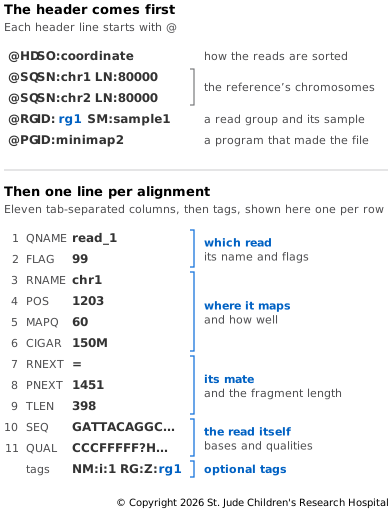
A SAM or BAM file starts with a header. Each header line begins with @ and a
two-letter type, followed by tab-separated fields written as TAG:VALUE (SAM
specification). The specification
defines five header types:
@HDcomes first and says how the records are sorted.SO:coordinatemeans by position,SO:querynameby read name andSO:unsortednot at all.@SQlines list the reference sequences the reads were mapped to, one line per chromosome, with its name (SN) and length (LN). The chromosome in every record must be one of these names. The names and lengths are also a quick way to tell which version of the reference a file was mapped to.@RGdescribes a read group, a set of reads that were sequenced together, such as one lane of a run. It's there only if someone added it, for example by passing a read group to the aligner. ItsIDis what records point to, andSMnames the sample. One file can hold reads from several read groups — from several lanes or runs, or even several samples — each with its own@RGline, and theRGtag on each record says which group the read came from (SAM tags specification).@PGrecords a program that worked on the file: its name (PN), version (VN) and the full command line (CL). Each@PGline'sPPfield names the program that came before it, so together they trace the steps that made the file. Not every tool adds one, so the trail can have gaps.@COis a free-text comment, a place for people or tools to leave notes about the file. A header can have any number of them (SAM specification).
The Columns
After the header, each line is one alignment, with eleven tab-separated columns in a fixed order (SAM specification):
- QNAME is the read's name, the same as in the FASTQ file. Both reads of a pair share it.
- FLAG is a number that adds up several yes-or-no facts about the read, such as whether it mapped and which strand it is on (see Flags below).
- RNAME is the chromosome the read mapped to. It must be one of the
@SQnames in the header. - POS is the position of the first aligned base. Positions in SAM count from 1, as in VCF files.
- MAPQ is the mapping quality, how sure the aligner is that the read belongs here (see Read Mapping). A value of 255 means no mapping quality is available.
- CIGAR says how the read lines up with the reference, base by base, in runs of matches, insertions, deletions and clipped bases (see What the Aligner Records).
- RNEXT is the chromosome the mate mapped to.
=means the same chromosome as this read. - PNEXT is the mate's position.
- TLEN, the template length, is the length of the fragment, counted from the first mapped base of the pair to the last. It is positive on the leftmost read and negative on the rightmost, so the two reads of a pair carry the same number with opposite signs. Soft-clipped bases aren't counted, and TLEN is 0 when the mate didn't map or mapped to a different chromosome.
- SEQ is the read's bases.
- QUAL is the read's quality characters, written as in the FASTQ file (see FASTQ Files).
A column that has nothing to say holds a placeholder: * for text and 0 for numbers. An
unmapped read with no position, for instance, has * for RNAME and 0 for POS.
SEQ and QUAL come with one twist. A read that mapped to the reverse strand is stored the way it reads along the reference: its bases are reverse-complemented and its quality characters reversed.
Flags
The flag in column 2 adds up the values of every fact that is true about the read (see Read Mapping). There are twelve (SAM specification):
| Value | Hex | Meaning |
|---|---|---|
| 1 | 0x1 | The read is one of a pair |
| 2 | 0x2 | The pair mapped as the aligner expects |
| 4 | 0x4 | The read didn't map |
| 8 | 0x8 | Its mate didn't map |
| 16 | 0x10 | The read mapped to the reverse strand |
| 32 | 0x20 | Its mate mapped to the reverse strand |
| 64 | 0x40 | The read is Read 1 |
| 128 | 0x80 | The read is Read 2 |
| 256 | 0x100 | A secondary alignment, another place the read could map |
| 512 | 0x200 | The read failed quality checks |
| 1024 | 0x400 | A duplicate (see Marking Duplicates) |
| 2048 | 0x800 | A supplementary alignment, for part of the read mapped elsewhere |
You don't have to do the sums yourself. samtools flags turns a flag into its list of
facts, and samtools view can filter on them: -f keeps reads that have all the given
bits set, and -F drops reads that have any of them (samtools
documentation).
Tags
After the eleven columns come optional tags, each written as TAG:TYPE:VALUE. The
type is a single letter, such as i for a whole number, f for a decimal, Z for text
and A for one character. A few common ones (SAM tags
specification):
RGnames the read's read group, matching anIDin the header's@RGlines.NMis the edit distance: the number of mismatches plus inserted and deleted bases between the read and the reference.MDrecords which reference bases the read differs from.ASis the alignment score that the aligner gave the read.MCis the mate's CIGAR string.SAlists the other parts of a read that was split across supplementary alignments.
Which tags a file has depends on the tools that wrote it. Tags starting with X, Y or
Z, and tags with lowercase letters, are left free for tools and users to define for
themselves (SAM specification).
minimap2 uses lowercase tags for its own details, such as tp, which marks an
alignment as primary or secondary (minimap2
manual).
SAM, BAM and CRAM
SAM is easy to read and easy for programs to write, but large. BAM holds the same records in a fraction of the space, and it saves that space in two steps (SAM specification):
- It packs each record into binary. Numbers such as the position and the mapping
quality are stored as fixed-size binary numbers rather than strings of digits. The
chromosome is stored as its place in the header's
@SQlist rather than its name, and each base takes half a byte, where SAM spends a whole character on it. - It compresses the packed records with BGZF (see Compression and BGZF), which squeezes out the repetition that is left, such as read names that begin the same way.
CRAM goes further: it compares each read with the reference and stores only where they differ (Fritz et al., 2011).
That saving comes with a catch. Most CRAM files leave the reference out, so the same
reference has to be found again to read them. HTSlib looks for it in the places you
point it to, such as a FASTA file given with -T, or a local cache of references named
by their checksums. If it can't find it, reading fails (HTSlib
documentation). Keep the reference
alongside your CRAM files. A CRAM file's index ends in .crai.
Setting Up
If you made the file-formats environment and folder on FASTQ
Files, run conda activate file-formats and cd file-formats, then skip to Try It. Otherwise, follow Setting
Up on FASTQ Files first. This page uses samtools, fq
and minimap2 from that environment, along with wgsim, a read simulator that comes
with samtools, so there's nothing extra to install.
Try It
Here you'll build a synthetic BAM file to explore. Start with a small made-up reference:
# Make two random sequences of 80,000 bases each
fq generate --seed 1 --record-count 2 --read-length 80000 parts.fq /dev/null
# Turn them into a FASTA reference with two chromosomes, chr1 and chr2
awk 'NR%4==2 {n++; print ">chr" n; print}' parts.fq > ref.fa
# Index the reference
samtools faidx ref.fa
fq generate is meant for making test FASTQ files (see FASTQ
Files), not references, but its random bases serve just as
well here, so we borrow it for the job. It always writes a pair of files, so the second
one goes to /dev/null, which throws it away. awk keeps the second line of each
record, the bases, and gives each sequence a name.
Next, simulate reads from the reference:
# Simulate 20,000 read pairs of 150 bases each
wgsim -S 1 -N 20000 -1 150 -2 150 ref.fa sample1_1.fq sample1_2.fq > /dev/null
wgsim picks fragments at random from the reference and writes a read from each end. To
make the reads realistic, it adds sequencing errors to about 2% of their bases and a few
mutations, so the sample differs from the reference. It prints a list of those
mutations, which > /dev/null throws away. -S 1 here and --seed 1 for fq generate
fix the random choices, so every run makes the same reference and the same reads. With
the versions from Setting Up, your output should match ours; other versions may pick
different reads.
Map the reads, sort them by position and index the result:
# Map the pairs, label them with a read group, and sort them into a BAM file
minimap2 -ax sr -R '@RG\tID:sample1\tSM:sample1' ref.fa sample1_1.fq sample1_2.fq \
  | samtools sort -o sample1.bam -
# Index the BAM file
samtools index sample1.bam
-R gives minimap2 a read group line to put in the header, and it tags every record
with the read group's ID. Now look at the header:
# Print the header, without adding a @PG line for this command
samtools view -H --no-PG sample1.bam
@HD	VN:1.6	SO:coordinate
@SQ	SN:chr1	LN:80000
@SQ	SN:chr2	LN:80000
@RG	ID:sample1	SM:sample1
@PG	ID:minimap2	PN:minimap2	VN:2.31-r1302	CL:minimap2 -ax sr -R @RG\tID:sample1\tSM:sample1 ref.fa sample1_1.fq sample1_2.fq
@PG	ID:samtools	PN:samtools	PP:minimap2	VN:1.24	CL:samtools sort -o sample1.bam -
samtools sort set SO:coordinate. The two @SQ lines come from ref.fa, and the
@RG line from -R. The two @PG lines record both commands, and PP:minimap2 shows
that samtools sort ran on the output of minimap2. Without --no-PG, samtools view
would add a third @PG line for itself, even though it isn't saved in the file.
Now the records. Here are the first nine columns of the first one:
# Show the first nine columns of the first record
samtools view sample1.bam | head -n 1 | cut -f 1-9
chr1_9_566_3:0:0_2:0:0_1f27 99 chr1 9 60 150M = 417 558
wgsim names each pair after where it came from. This pair came from chr1, between
bases 9 and 566. The rest of the name counts the errors, substitutions and indels it
added to each read, then gives a number to tell pairs apart. Both reads of a pair share
the name, so grep finds the mate:
# Show the first nine columns of both reads in the pair
samtools view sample1.bam | grep "^chr1_9_566_" | cut -f 1-9
chr1_9_566_3:0:0_2:0:0_1f27	99	chr1	9	60	150M	=	417	558
chr1_9_566_3:0:0_2:0:0_1f27	147	chr1	417	60	150M	=	9	-558
Each read points at the other: = for the same chromosome, then the other's position.
The second read starts at 417 and covers 150 bases, so it ends at 566, just where
wgsim said the fragment ended. TLEN is 566 − 9 + 1 = 558, positive on the left read
and negative on the right one. The aligner put both reads back where they came from.
Decode the second read's flag:
# List the facts packed into flag 147
samtools flags 147
0x93 147 PAIRED,PROPER_PAIR,REVERSE,READ2
It is Read 2 of a properly paired read, mapped to the reverse strand, so its bases are stored reverse-complemented. Last, the tags of both reads:
# Show the tags of both reads in the pair
samtools view sample1.bam | grep "^chr1_9_566_" | cut -f 12-
RG:Z:sample1	NM:i:3	ms:i:274	AS:i:274	nn:i:0	tp:A:P	cm:i:12	s1:i:210	s2:i:0	de:f:0.02	rl:i:0
RG:Z:sample1	NM:i:2	ms:i:280	AS:i:280	nn:i:0	tp:A:P	cm:i:14	s1:i:210	s2:i:0	de:f:0.0133	rl:i:0
RG:Z:sample1 ties both reads to the @RG line in the header. NM is 3 for the first
read and 2 for the second, the same as the error counts in the name. wgsim gave these
two reads errors but no mutations, so here NM counts only errors. In real data, it
mixes errors with true differences between the sample and the reference. AS is the
alignment score from minimap2, and the lowercase tags are its own.
Finally, compare the three formats. Write the same records as SAM and as CRAM:
# Write the records as SAM text, with the header
samtools view -h -o sample1.sam sample1.bam
# Write them as CRAM, compressed against ref.fa
samtools view -C -T ref.fa -o sample1.cram sample1.bam
# Compare the sizes
ls -lh sample1.sam sample1.bam sample1.cram
On our computer, the sizes were:
1.9M sample1.bam
484K sample1.cram
 18M sample1.sam
BAM is about a tenth the size of SAM, and CRAM a quarter of BAM. These reads flatter
both, though. wgsim gives every base the same quality score, which compresses to
almost nothing; real quality scores vary, so expect real files to shrink less.
VCF/BCF Files calls variants from this BAM file, so keep the
reference and sample1.bam. Delete the rest:
# Delete the reads and the SAM and CRAM copies
rm parts.fq sample1_1.fq sample1_2.fq sample1.sam sample1.cram
Next, where variant calls go — VCF/BCF Files.