VCF/BCF Files
A variant caller writes its calls as a VCF (Variant Call Format) file (see Calling Variants). Like SAM, VCF is tab-separated text: a header that describes the file, then one line per variant (VCF specification). One file can hold many samples, each with its own column, so it works like a table with a row for every variant and a column for every sample. VCF files are usually compressed with BGZF and indexed, so tools can jump straight to a region (see Compression and BGZF).
The latest version of the specification is 4.5. Each version adds to the last but keeps
the same layout, so this page sticks to what they share. bcftools still labels its
files version 4.2, as you'll see in Try It.
The Header
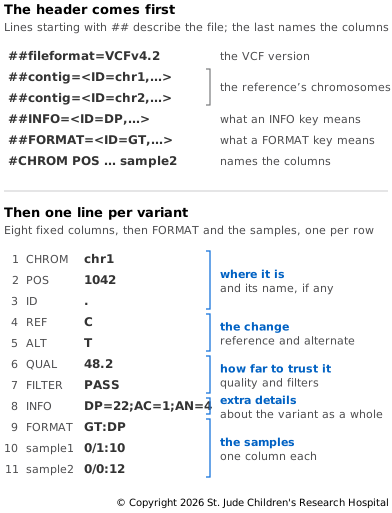
Header lines start with ##. The first must be ##fileformat, which gives the version
of the specification. After that, a header line can hold any key=value pair, such as
the reference or the command that made the file, but a few kinds have a fixed structure
(VCF specification):
##contiglines list the reference sequences, with each one's name (ID) and length, much like the@SQlines in a BAM file.##INFOand##FORMATlines define the keys used in the INFO and FORMAT columns. Each gives the key'sID, how many values it takes (Number), what kind of values they are (Type, such asInteger,Float,StringorFlag) and aDescription.##FILTERlines define the names that can appear in the FILTER column.
Number is usually a count, but some keys take a different number of values on each
line. For those, A means one value per alternate allele, R one per allele including
the reference, G one per possible genotype and . a number that varies. These
definitions make a VCF file explain itself: when you meet a key you don't know, look it
up in the header.
The last header line starts with a single # and names the columns. The first eight are
always the same: #CHROM, POS, ID, REF, ALT, QUAL, FILTER and INFO. If
the file holds samples, a FORMAT column follows, then one column for each sample,
named after it. A file with no samples, such as a catalog of known variants, stops at
INFO.
The Columns
After the header, each line is one variant, with the eight fixed columns in order (VCF specification):
- CHROM is the chromosome, named as in the reference.
- POS is the position of the first base in REF. Positions count from 1, as in SAM files.
- ID is a name for the variant, such as an rs number from dbSNP. Several names are separated by semicolons.
- REF is the reference allele: the bases in the reference, starting at POS.
- ALT is the alternate allele. If there is more than one, they are separated by
commas, as in
T,G. - QUAL says how sure the caller is that the alternate allele is really there, on the Phred scale (see Genotype Likelihoods).
- FILTER is
PASSif the variant passed every filter, or the names of the filters it failed, separated by semicolons (see Filtering Calls). - INFO holds extra details about the variant as a whole, written as
key=valuepairs separated by semicolons. A key of typeFlagappears on its own, with no value. A few keys are reserved, such asAC, the number of alternate alleles across all the samples' genotypes, andAN, the total number of alleles in those genotypes.
A column with nothing to say holds a period, ., the missing value. A FILTER of .
means no filters have been applied yet, which is not the same as PASS.
Genotypes
When a file holds samples, column 9, FORMAT, lists the keys for each sample's
values, separated by colons, such as GT:DP. Each sample's column then gives its values
in the same order, such as 0/1:10. If there is a genotype, GT, it comes first
(VCF specification). The other
common keys, PL, DP and AD, are explained in Calling
Variants.
GT numbers the alleles: 0 is REF, 1 is the first ALT, 2 the second and so on. There is one number for each copy of the chromosome:
0/0: both copies match the reference.0/1: one copy carries the alternate allele, so the sample is heterozygous.1/1: both copies carry it, so the sample is homozygous for the alternate allele.1/2: each copy carries a different alternate allele../.: no genotype could be called, for example because no reads covered the position.
A / means the genotype is unphased: it doesn't say which copy carries which
allele. A | means it is phased, so 0|1 and 1|0 say different things (see Same
Genotype, Different
Haplotypes).
When samples are called together, every sample gets a genotype at every variant in the
file, so a sample whose reads clearly show the reference gets 0/0. When samples are
called one at a time and their files merged, a sample with no line for a variant gets
./. by default, because its file can't tell whether it matched the reference or had no
reads there (bcftools
documentation).
Writing Indels
An indel's REF and ALT include the base just before it, so that neither is empty, and POS points to that base (see Describing and Finding Indels). The same indel can still be written more than one way. In a run of repeated bases, any copy could be the one deleted, and extra shared bases can be added to both REF and ALT without changing what they describe.
So callers and other tools don't always agree. A normalized record is shifted as far
left as it will go and trimmed to the fewest bases (Tan et al.,
2015), and bcftools norm normalizes a
file. It can also split a record with several alternate alleles into one record per
allele (bcftools
documentation). Variant
Equivalence explains why this step
is needed when you compare calls; Try It below shows it on a real record.
VCF and BCF
BCF is to VCF what BAM is to SAM: the same records, packed into binary and
compressed with BGZF, so it can be indexed too (VCF
specification). bcftools reads and
writes both. In Calling Variants,
-Ou passed the calls from one bcftools command to the next as uncompressed BCF,
which saves converting them to text and back.
Setting Up
This page uses bcftools, wgsim, minimap2 and samtools from the file-formats
environment, and the files ref.fa and sample1.bam from SAM/BAM/CRAM
Files. If you've done that page's Try It, run conda activate file-formats and cd file-formats. Otherwise, follow Setting
Up on FASTQ Files, then the Try It on SAM/BAM/CRAM Files.
Try It
SAM/BAM/CRAM Files left you with a made-up reference and one sample's reads mapped to
it. Make a second sample the same way, with a different seed so that it gets different
mutations. This time, keep the list of mutations wgsim prints:
# Simulate 20,000 read pairs for a second sample, saving the list of mutations
wgsim -S 2 -N 20000 -1 150 -2 150 ref.fa sample2_1.fq sample2_2.fq > sample2_mutations.txt
# Map the pairs, label them with their own read group, and sort them into a BAM file
minimap2 -ax sr -R '@RG\tID:sample2\tSM:sample2' ref.fa sample2_1.fq sample2_2.fq \
  | samtools sort -o sample2.bam -
# Index the BAM file
samtools index sample2.bam
Now call variants in both samples together:
# Build the pileup from both samples, then call the variants
bcftools mpileup -f ref.fa -a FORMAT/AD,FORMAT/DP -Ou sample1.bam sample2.bam \
  | bcftools call -m -v -Oz -o calls.vcf.gz
# Index the calls
bcftools index -t calls.vcf.gz
These are the same commands as in Calling
Variants, with two BAM
files instead of one. bcftools notes that it found 2 samples in 2 input files, and it
names each sample after the SM field in that file's @RG line.
Look at the header. It has 31 lines, so grep picks out a few:
# Show the version, the chromosomes, a few key definitions and the column names
bcftools view -h --no-version calls.vcf.gz \
  | grep -E '^##(fileformat|contig)|ID=(DP|AD|GT|AC|AN),|^#CHROM'
##fileformat=VCFv4.2
##contig=<ID=chr1,length=80000>
##contig=<ID=chr2,length=80000>
##INFO=<ID=DP,Number=1,Type=Integer,Description="Raw read depth">
##FORMAT=<ID=DP,Number=1,Type=Integer,Description="Number of high-quality bases">
##FORMAT=<ID=AD,Number=R,Type=Integer,Description="Allelic depths (high-quality bases)">
##FORMAT=<ID=GT,Number=1,Type=String,Description="Genotype">
##INFO=<ID=AC,Number=A,Type=Integer,Description="Allele count in genotypes for each ALT allele, in the same order as listed">
##INFO=<ID=AN,Number=1,Type=Integer,Description="Total number of alleles in called genotypes">
#CHROM	POS	ID	REF	ALT	QUAL	FILTER	INFO	FORMAT	sample1	sample2
The ##contig lines come from ref.fa. DP is defined twice, once as an INFO key, the
depth across all the samples, and once as a FORMAT key, the depth for each sample. AD
has Number=R, one count for each allele including the reference, and AC has
Number=A, one count for each alternate allele. The last line names the two samples.
Now the first record:
# Show the first record
bcftools view -H calls.vcf.gz | head -n 1
chr1 736 . C A 127.014 . DP=90;VDB=0.889516;SGB=-14.5426;RPBZ=0.757696;MQBZ=0;MQSBZ=0;BQBZ=-1.09322;SCBZ=0;MQ0F=0;AC=2;AN=4;DP4=23,26,22,19;MQ=60 GT:PL:DP:AD 1/1:166,120,0:40:0,40 0/0:0,148,172:50:49,0
At position 736 of chr1, the reference has C and some reads show A. The variant has no
ID, its QUAL is 127, and FILTER is . because nothing has filtered these calls yet. In
INFO, DP=90 counts the reads from both samples, and AC=2;AN=4 says that two of the
four alleles in the genotypes are A. The other INFO keys are measures that bcftools
adds, each described in the header.
The last two columns are the samples, read with GT:PL:DP:AD. Sample 1 is 1/1: all 40
of its reads here show A. Sample 2 is 0/0: 49 of its 50 reads show C, and the other
shows a G, a sequencing error. Both samples have a genotype here, though only one
carries the variant. Next, list the first few variants with both genotypes:
# Show the position, alleles and both genotypes of the first five variants
bcftools query -f '%CHROM\t%POS\t%REF\t%ALT[\t%GT]\n' calls.vcf.gz | head -n 5
chr1	736	C	A	1/1	0/0
chr1	750	TCCCC	TCCC	0/0	0/1
chr1	1522	A	G	0/1	0/0
chr1	1527	C	G	0/0	0/1
chr1	2098	G	T	0/1	0/0
bcftools query prints the fields you name: each % field once per line, and whatever
is inside [ ] once for each sample. Now count how many variants have each pair of
genotypes:
# Count how many variants have each pair of genotypes
bcftools query -f '[%GT ]\n' calls.vcf.gz | sort | uniq -c
 102 0/0 0/1
  51 0/0 1/1
  92 0/1 0/0
  47 1/1 0/0
The counts add up to 292 variants, and every one is in one sample and not the other.
wgsim chose each sample's mutations at random, so the two share none. Check a few
calls against the mutations that wgsim made in sample 2:
# Show the first two mutations in sample 2
head -n 2 sample2_mutations.txt | cut -f 1-4
chr1	754	C	-
chr1	1527	C	S
The columns are the chromosome, the position, the reference base and what wgsim
changed it to. At 1527, S is the code for "C or G": wgsim changed one copy of the C
to G. That is the fourth variant above, C to G at 1527, with sample 2 heterozygous.
At 754, wgsim deleted a C, yet there's no variant at 754. Look at the reference around
it:
# Show the reference from 748 to 756 on chr1
samtools faidx ref.fa chr1:748-756
>chr1:748-756
AGTCCCCTG
Positions 751 to 754 are a run of four C's. Deleting any one of them leaves the same
sequence, TCCCT. wgsim recorded the last C. bcftools wrote the same deletion as
the second variant above, starting from the T at 750: REF TCCCC, ALT TCCC. Normalize
the calls and look again:
# Left-align and trim the variants
bcftools norm -f ref.fa -Oz -o calls.norm.vcf.gz calls.vcf.gz
# Index the result
bcftools index -t calls.norm.vcf.gz
# Show the deletion before normalizing
bcftools view -H -r chr1:750 calls.vcf.gz | cut -f 1-5
# Show it after
bcftools view -H -r chr1:750 calls.norm.vcf.gz | cut -f 1-5
Lines   total/split/joined/realigned/mismatch_removed/dup_removed/skipped:	292/0/0/17/0/0/0
chr1	750	.	TCCCC	TCCC
chr1	750	.	TC	T
bcftools norm changed 17 of the 292 records. This one became REF TC, ALT T: the T
at 750, then the first C of the run deleted. The deletion is now written as short as it
can be and as far left as it can go. wgsim's list, the call and the normalized call
are three ways of writing one deletion. A tool comparing them as text would see three
different variants.
Keep the folder. The next page uses ref.fa, sample1.bam and calls.vcf.gz.
Next, a much simpler format for listing regions of the genome — BED Files.