FASTQ Files
Sequencing data almost always reaches you as FASTQ files: plain text files that store each read's bases together with a quality score for every base (Cock et al., 2010). They are the usual starting point for an analysis, including the one in From Reads to Variants.
An Illumina instrument doesn't write FASTQ itself. It stores its base calls in a binary
format of its own, BCL, and conversion software turns them into FASTQ files, one set per
sample. Illumina's current converter is BCL Convert, which is planned to replace the
older bcl2fastq
(Illumina).
A sequencing core usually runs this step for you, so FASTQ files are what you receive.
The Four Lines
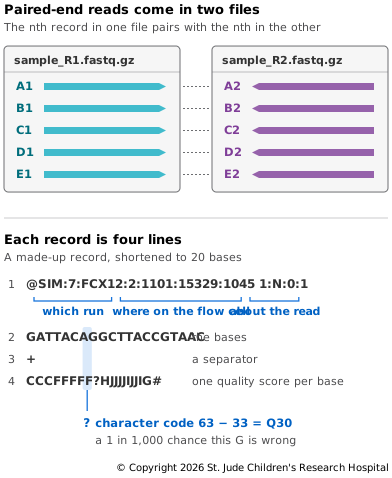
A FASTQ file is a long list of records, one per read. The format allows long sequences to wrap onto several lines, but short-read files almost never do, so in practice every record takes four lines (Figure 6.3):
- The name, which starts with
@. - The bases, written as A, C, G and T, with N where no base could be called.
- A separator,
+. Some older files repeat the name after it. - The quality scores, one character per base, so this line is exactly as long as line 2.
Illumina read names are built from fields separated by colons
(Illumina).
The first part names the instrument, run and flow cell, then the lane, the tile and the
x and y position of the cluster on that tile. Together these are unique within a run.
After a space comes a second part, for example 1:N:0:1: the read number (1 or 2),
whether the read was filtered out (Y or N), a control number, and the sample's number on
the run's sample sheet (some software writes the sample's index sequence here instead).
Tools differ in whether they keep this second part, so you won't always see it.
Quality Characters
Each quality score is stored as a single printable character. To write a score, add 33
and use the character with that code; to read one, take the character's code and
subtract 33. In Figure 6.3, ? is code 63, so Q30, a 1 in 1,000 chance that the base is
wrong. # is code 35, Q2, and I is code 73, Q40. Files from some older Illumina
pipelines add 64 instead of 33 (Cock et al.,
2010), so if you inherit old data, check which
offset it uses before trusting its scores.
Newer Illumina instruments also round their scores into a few bins to save space (Illumina), so their files use only a handful of distinct quality characters.
Paired Files
A paired-end run (see Paired-End
Reads)
usually gives each sample two FASTQ files: Read 1 of every pair goes in one and Read 2
in the other, in the same order. The tenth record in one file and the tenth record in
the other are the two ends of the same fragment, and they share a name. Nothing else
ties them together. If one record goes missing from one file, every pair after it is
mismatched, so it pays to check paired files with fq lint before using them (see Try
It). Some tools instead write both reads of each pair into a single
interleaved file, alternating Read 1 and Read 2. A single-end run gives one file per
sample.
Compression
FASTQ files are large, so they are almost always compressed with gzip and end in
.fastq.gz or .fq.gz. Unlike the files on Compression and
BGZF, they can't be sorted and indexed by position. A read
has no position in the genome until it is mapped, so there is nothing to sort the
records by and nothing for an index to point to. Tools simply read a FASTQ file from
start to finish, so BGZF's blocks buy nothing, and we prefer plain gzip, which
compresses a little better. Sorting and indexing come after mapping, with BAM
files.
Setting Up
The exercises in this chapter use five packages from conda (see Setting
Up in From Reads to Variants if you
haven't installed it): HTSlib, the library behind samtools, which brings the bgzip,
tabix and htsfile tools; samtools, which also brings the read simulator wgsim;
bcftools, the variant caller from Calling
Variants; fq, which makes and
checks FASTQ files; and minimap2, the aligner from Read
Mapping:
# Create an environment named file-formats with the five packages, at fixed versions
conda create -n file-formats --strict-channel-priority -c conda-forge -c bioconda \
  htslib=1.24 samtools=1.24 bcftools=1.24 fq=0.12.0 minimap2=2.31
# Switch to the environment so its tools are on your path
conda activate file-formats
Then make a folder to work in:
# Make a folder for this chapter's exercises
mkdir file-formats
# Move into it
cd file-formats
Try It
fq generate makes a pair of FASTQ files filled with random reads, so you can try
things out without downloading anything:
# Make 100,000 random read pairs, 150 bases each
fq generate --seed 1 --record-count 100000 --read-length 150 reads_1.fq.gz reads_2.fq.gz
--seed 1 fixes the random choices, so you get the same files we did. Start with the
first line of each file, the name of the first read:
# Print the first line of Read 1
gunzip -c reads_1.fq.gz | head -n 1
# Print the first line of Read 2
gunzip -c reads_2.fq.gz | head -n 1
@fqlib8:39:EIMYCKH:6:35:8863:5842/1
@fqlib8:39:EIMYCKH:6:35:8863:5842/2
The names follow Illumina's pattern: instrument fqlib8, run 39, flow cell EIMYCKH,
lane 6, tile 35, at position 8,863, 5,842 on the tile. In place of a second part, they
end in /1 and /2, another way of marking which read of the pair each one is; some
tools, samtools fastq among them, can add these too. Apart from that ending, the names
match, as the first pair's should.
Each record is four lines, so counting lines and dividing by four counts reads:
# Count the reads in Read 1
gunzip -c reads_1.fq.gz | awk 'END {print NR/4}'
# Count the reads in Read 2
gunzip -c reads_2.fq.gz | awk 'END {print NR/4}'
100000
100000
The second line of each record holds the bases, so its length is the read length. This tallies the lengths in Read 1:
# Count how many reads have each length
gunzip -c reads_1.fq.gz | awk 'NR%4==2 {print length($0)}' | sort -n | uniq -c
100000 150
Every read is 150 bases long, as asked. Raw reads from a run are usually all the same length too. Trimming, which cuts adapters and poor-quality ends off reads, leaves lengths that vary.
htsfile, from HTSlib, reports what kind of file it's given:
# Identify the file format
htsfile reads_1.fq.gz
reads_1.fq.gz: FASTQ gzip-compressed sequence data
fq generate wrote plain gzip, as we prefer for FASTQ, because the names end in .gz.
Finally, fq lint checks a FASTQ file, or a pair of them, for the mistakes that break
later steps: incomplete records, characters that don't belong, a quality line that
doesn't match its bases, and names that don't match between the two files of a pair:
# Check both files
fq lint reads_1.fq.gz reads_2.fq.gz
# Print the exit status; 0 means no problems
echo $?
fq lint prints a few progress messages, and echo $? prints its exit status, 0. To
see a failure, make a copy of Read 2 with its second record, lines 5 to 8, removed, and
check again:
# Copy reads_2.fq.gz without its second record
gunzip -c reads_2.fq.gz | sed '5,8d' | gzip > reads_2.bad.fq.gz
# Check the original Read 1 file against the damaged copy
fq lint reads_1.fq.gz reads_2.bad.fq.gz
reads_1.fq.gz:5:1: [P001] NamesValidator: names mismatch: expected '@fqlib8:39:EIMYCKH:6:42:7281:9430', got '@fqlib8:39:EIMYCKH:8:27:2165:5306'
fq lint stops at line 5 of Read 1, the second record, whose partner now has the name
of the third read. It compares names without the /1 and /2. Every pair from there on
is out of step, and it exits with a status of 1.
When you're done, delete the files made on this page:
# Delete the generated reads and the damaged copy
rm reads_1.fq.gz reads_2.fq.gz reads_2.bad.fq.gz
Next, where reads go once they're mapped — SAM/BAM/CRAM Files.