Filtering and Checking Calls
The caller has written down every variant it found, but some of those calls are wrong. This page does two things. First, it sets aside the calls most likely to be errors. Second, it checks the rest against HG002's truth set to measure how accurate they are.
Filtering Calls
A filter is a rule that marks calls as likely errors. The simplest kind, a hard filter, sets a separate cutoff on each of one or more measures: for example, a QUAL below 30, or fewer than 10 reads covering the site. Other common measures are strand bias, where the alternate allele shows up mostly in reads from one strand of the DNA, and low mapping quality, where the reads at a site may belong somewhere else in the genome (GATK documentation).
Filters can delete the calls that fail, but often they don't. In soft filtering,
they write a label in the VCF's FILTER column instead: the name of the filter that
failed, or PASS if none did (VCF/BCF
Files). The failed calls stay in the file,
so you can look at them later or change your mind about the threshold.
Every cutoff is a tradeoff. Make it stricter and you set aside more errors, but also more real variants. Because a hard filter checks each measure on its own, it can throw out a good variant just because one of its measures looks bad. Larger studies often use a learned filter instead, which trains a model on variants already known to be real and scores each call on many measures together. GATK's version needs a large number of variants and well-curated known variants to learn from, so it doesn't suit small experiments like a gene panel (GATK documentation).
Truth Sets
A filter only guesses which calls are wrong. To check, you need a list of the variants the sample really carries. For a few genomes, including HG002, Genome in a Bottle has sequenced the DNA with many different technologies (Zook et al., 2016) to build such lists. The truth set you downloaded on Setting Up comes from a near-complete assembly of HG002's genome. It is the best answer available, but it is still a draft and can be wrong in places.
The truth set's BED file is as important as its VCF. It lists the benchmark regions, the parts of the genome where Genome in a Bottle is confident the list is complete and correct. A comparison counts only calls in those regions, because elsewhere there is no confident answer to check them against. The hardest parts of the genome are the most likely to be left out, so the results describe how well a pipeline does on the easier variants and regions. They tend to be better than they would be across the whole genome, so don't assume they hold for the regions left out (Krusche et al., 2019).
Precision and Recall
Comparing your calls with the truth set gives three kinds of result:
- A true positive is a call that matches a variant in the truth set, genotype and all.
- A false positive is a call that doesn't match any variant in the truth set.
- A false negative is a variant in the truth set that no call matches.
From these come two measures (Krusche et al., 2019). Precision is the share of your calls that are right: true positives divided by all your calls. Recall, also called sensitivity, is the share of the true variants you found: true positives divided by all the variants in the truth set.
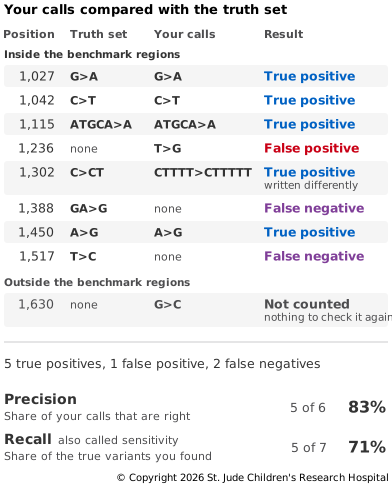
You need both measures, because each one is easy to improve on its own. A pipeline that calls only its most certain variants can have high precision but low recall. One that calls every possible difference can have high recall but low precision. A stricter filter usually trades a little recall for more precision.
Matching Calls
Deciding whether a call matches the truth set is harder than it looks, because the same
variant can be written in more than one way (Variant
Equivalence). In Figure 5.6, the
truth set writes the insertion at 1,302 as C>CT, while the call writes it as
CTTTT>CTTTTT. Both add one T to the same run of T's. Comparing VCF records one line at
a time would count these as a false positive and a false negative, even though they are
the same variant (Krusche et al., 2019).
Tools built for this, such as vcfeval from RTG Tools, avoid the problem by applying
the variants to the reference and comparing the sequences that result. For a call to
count as a match, its genotype must be right too: both copies have to match (RTG Tools
documentation).
So a call at the right position with the wrong genotype counts twice, as a false
positive for the call and a false negative for the true variant.
Try It
This step needs chr20.fa and the three truth set files from Setting
Up, and hg002.calls.vcf.gz from Calling
Variants. Run it from the same folder, with the
reads-to-variants environment active. First, filter the calls:
# Label calls with low QUAL or low depth as LowQual
bcftools filter -s LowQual -e 'QUAL<30 || FORMAT/DP<10' -Oz -o hg002.filtered.vcf.gz hg002.calls.vcf.gz
# Keep only the calls that passed
bcftools view -f PASS -Oz -o hg002.pass.vcf.gz hg002.filtered.vcf.gz
# Index them
bcftools index -t hg002.pass.vcf.gz
-e gives the rule for which calls to exclude: those with a QUAL below 30, or a depth
below 10. -s LowQual says to label those calls LowQual in the FILTER column rather
than remove them. bcftools view -f PASS then writes only the calls that passed to a
new file. To see how many calls got each label:
# Count the calls with each FILTER label
bcftools query -f '%FILTER\n' hg002.filtered.vcf.gz | sort | uniq -c
29 calls are labeled LowQual and 1,771 PASS. Almost all of the 29 have a low QUAL;
only a few have a low depth.
Next, compare the calls that passed with the truth set. vcfeval reads the reference in
RTG Tools' own format, so convert it first:
# Convert the reference to RTG Tools' format
rtg format -o chr20.sdf chr20.fa
# Compare the calls with the truth set
rtg vcfeval \
  -b HG002_GRCh38_v5.0q_smvar.vcf.gz \
  -e HG002_GRCh38_v5.0q_smvar.benchmark.bed \
  -c hg002.pass.vcf.gz \
  -t chr20.sdf \
  --region chr20:10000000-11000000 \
  --vcf-score-field QUAL \
  -o eval
-b is the truth set, which RTG Tools calls the baseline, and -e its benchmark
regions. -c is your calls and -t the reference. --region limits the comparison to
the region your reads came from. Without it, every true variant elsewhere on chromosome
20 would count as a false negative. --vcf-score-field QUAL tells vcfeval how
confident each call is, and -o names a folder for the results. On our computer, both
steps took about a second each. The results folder must not already exist, so before you
run the comparison again, delete it:
# Delete the results of the last comparison
rm -r eval
vcfeval ends by printing a summary table, also saved as eval/summary.txt. Look at
the row whose Threshold is None, which applies no QUAL cutoff:
True-pos-baselineandTrue-pos-callare the true positives, counted in the truth set and in your calls. They can differ by one or two, because one record in one file can match two in the other.False-posandFalse-negare the false positives and false negatives.PrecisionandSensitivityare the two measures from above, as fractions.F-measurecombines precision and sensitivity into a single number.
For our calls, precision was 0.973 and sensitivity 0.957. Within the benchmark regions,
about 97% of the calls are right, and they found about 96% of the true variants. There
were 47 false positives and 76 false negatives. vcfeval skips calls that failed a
filter, but here you gave it only the calls that passed.
The other row comes from vcfeval trying every possible QUAL cutoff and reporting the
one with the best F-measure, a balance between precision and sensitivity (RTG Tools
documentation).
For us, it was a QUAL of about 81. That stricter cutoff removed 12 false positives but
lost 4 true variants. Our filter made the same kind of trade: compared with the
unfiltered calls, it removed 14 false positives but lost 7 true variants.
The errors are files too. eval/fp.vcf.gz holds the false positives and
eval/fn.vcf.gz the false negatives, so you can count how many involve an indel:
# Count the false positives
bcftools view -H eval/fp.vcf.gz | wc -l
# Count the false positives that are indels
bcftools view -H -v indels eval/fp.vcf.gz | wc -l
# Count the false negatives
bcftools view -H eval/fn.vcf.gz | wc -l
# Count the false negatives that are indels
bcftools view -H -v indels eval/fn.vcf.gz | wc -l
Indels are fewer than a fifth of the variants, both in your calls and in the truth set, but they make up 35 of the 47 false positives and 66 of the 76 false negatives. Look through the files and you'll see that most of the indel errors sit in runs of one repeated base or in short repeated patterns. Nearly all of the indel false positives are written in lowercase, which UCSC uses to mark repeats. Most of the false positives also sit within a few bases of a false negative. These are near misses: a call at the right place, but with the wrong genotype or length, so one mistake shows up in both files.
Finally, look at matches that are written differently. These commands show the position, REF and ALT of the first few matched indels in each file:
# Show the first matched indels in your calls
bcftools view -H -v indels eval/tp.vcf.gz | head -n 10 | cut -f 2,4,5
# Show the first matched indels in the truth set
bcftools view -H -v indels eval/tp-baseline.vcf.gz | head -n 10 | cut -f 2,4,5
Find a position that appears in both lists. Often the two files write the variant
differently, yet vcfeval counted them as a match, just like the made-up example in
Figure 5.6.
The last page sums up the chapter and points to where to go next: Conclusion.