Preparing Alignments
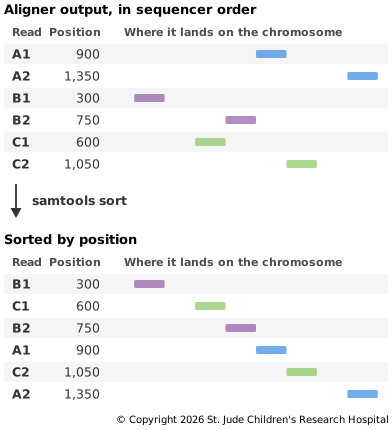
The aligner writes reads in the order they came off the sequencer, so reads next to each other in the file can come from anywhere on the chromosome. Before calling variants, three jobs remain: sorting the reads by position, marking duplicates and indexing the file. None of them changes where a read aligned. They reorder the reads in the file, label some of them and make the file quick to search.
Sorting by Position
A variant caller works along the genome one position at a time, and at each position it needs every read that covers it. In the aligner's output those reads are scattered through the file. Sorting by coordinate puts the alignments in order of chromosome, then position, so all the reads that overlap a spot sit together. Many tools after this point, including duplicate marking and indexing, need a sorted file.
Marking Duplicates
As described in Making Copies, some reads are copies of the same original fragment. Some come from PCR during library preparation. Others are optical duplicates, where the sequencer mistakes one cluster on the flow cell for two nearby clusters (samtools documentation). Copies aren't independent evidence. If a PCR error is copied into three reads, it looks like three reads support it, when it really came from one fragment.
Copies of one fragment start and end at the same places, so after mapping they line up exactly. Duplicate marking looks for read pairs that share both outer ends and face the same way. Among each set, it keeps the copy with the highest base qualities and flags the rest as duplicates (samtools documentation). A pair that shares only one end with another isn't a duplicate, because it came from a fragment of a different length.
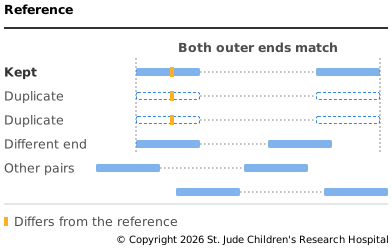
The duplicates stay in the file with a flag set, so nothing is lost. Many tools skip
flagged reads by default, including the bcftools variant caller used on the next page.
Matching ends don't always mean copies. In amplicon sequencing, every read from a target starts at the same primer, so marking would flag reads that are really independent, and it is usually skipped (samtools documentation). Libraries with unique molecular identifiers can be marked by tag as well as position, so only reads from the same original molecule count as copies.
Indexing
An index is a small companion file that records where in a BAM file each stretch of the genome begins. With it, a tool can jump straight to one region instead of reading the whole file from the start (samtools documentation). That is how Setting Up fetched one million bases from a remote file without downloading all of it. Only a sorted file can be indexed.
Steps Some Pipelines Add
Pipelines built on GATK, a widely used toolkit from the Broad Institute, often add base quality score recalibration at this stage. Sequencers make systematic errors when they assign quality scores, and recalibration models those errors from the data and adjusts the scores. It uses a list of known variant sites, so that real variants aren't counted as errors (GATK documentation). We leave it out to keep the pipeline short, since it needs GATK and a database of known variants.
Try It
This step needs hg002.mapped.bam from Read Mapping. Run it from
the same folder, with the reads-to-variants environment active:
# Add details about each read's mate, which duplicate marking needs later
samtools fixmate -m hg002.mapped.bam hg002.fixmate.bam
# Sort the alignments by position
samtools sort -o hg002.sorted.bam hg002.fixmate.bam
# Mark duplicates and print a summary
samtools markdup -s hg002.sorted.bam hg002.bam
# Index the final BAM file
samtools index hg002.bam
samtools fixmate copies details about each read's mate onto it, such as where the mate
aligned and its CIGAR string. With -m, it also adds a score for the mate's base
qualities. After sorting, mates can be far apart in the file, and samtools markdup
uses these details to judge a whole pair from either read (samtools
documentation). samtools index
writes the index next to the BAM file, as hg002.bam.bai.
Among the summary lines from samtools markdup is this one:
DUPLICATE TOTAL: 4354
That's 4,354 of 412,508 mapped reads, about 1%. Few were expected, because these
libraries were made without PCR (Zook et al.,
2016). Sorting also made the file smaller:
hg002.bam is about 40 MB, down from 57 MB, because compression saves space by spotting
text it has just seen (RFC 1951). Sorted reads
that overlap carry mostly the same bases, so there is far more nearby repetition to find
(see Compression and BGZF).
As a last check, measure the coverage across the region:
# Report how much of the region is covered, and how deeply
samtools coverage -r chr20:10000000-11000000 hg002.bam
samtools coverage skips duplicates by default. The coverage column shows that 99.99%
of the region's bases are covered by at least one read, and the meandepth column shows
an average depth of about 60, matching the 60× subset we downloaded. For what depth
means and how much is enough, see Depth and Read
Setup.
Next, call variants from the reads: Calling Variants.