BED Files
A BED (Browser Extensible Data) file lists regions of a genome, one per line (BED specification). It began as a format for the UCSC Genome Browser, which draws each region as a bar along the chromosome (UCSC Genome Browser FAQ), and it's now the usual way to hand a tool a set of regions. The benchmark regions of a truth set are one example (see Truth Sets); the exons of a set of genes are another.
BED is the simplest format in this chapter. There is no header, and each line is just a chromosome, a start and an end, with up to nine optional columns after them. Nothing in the file says which reference genome the positions belong to, so that has to come from wherever you got the file (BED specification).
In-Base and Interbase Coordinates
SAM and VCF use in-base coordinates: each number points to a base, starting from 1,
and a region includes the bases at both of its ends. In samtools, chr1:3-6 means
bases 3, 4, 5 and 6. BED uses interbase coordinates: each number points to a gap
between bases, starting from 0 before the first base, and a region runs from one gap to
another (BED specification). The same
four bases are chr1 2 6 in BED. You'll often see these called 1-based, fully
closed and 0-based, half-open coordinates for in-base and interbase, respectively.
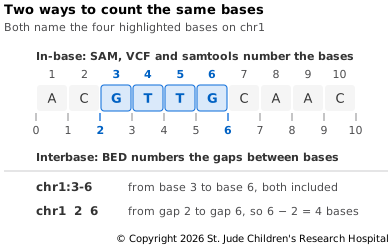
So to turn an in-base region into BED, subtract 1 from the start and keep the end. The length of a BED region is simply end minus start. A region whose start and end are the same holds no bases at all; it marks a point between two bases, such as where an insertion goes.
Mixing the two systems up moves a region by one base, and nothing warns you when it happens. Try It below shows how easily it can happen. These off-by-one errors are a common source of errors in bioinformatics.
This page covers just enough to work with BED files. For a detailed explanation of
in-base and interbase coordinates, including the history of these terms, see the
omics-coordinate
documentation.
The Columns
The first three columns are required, and the other nine are optional (BED specification):
- chrom is the chromosome, named as in the reference.
- chromStart is where the region starts, as an interbase position.
- chromEnd is where it ends. The base before chromEnd is the last one in the region.
- name is a label for the region, such as a gene name.
- score is a number from 0 to 1,000, which a browser can use to shade the region.
- strand is
+or-, or.if the region has no strand or it isn't known. - thickStart is where to start drawing the region thicker, such as at the start codon of a gene (UCSC Genome Browser FAQ).
- thickEnd is where to stop drawing it thicker, such as at the stop codon.
- itemRgb is a color for drawing the region, such as
255,0,0. - blockCount is how many blocks the region is split into. Blocks are usually exons.
- blockSizes is how long each block is, as a list separated by commas.
- blockStarts is where each block starts, counted from chromStart.
Columns are separated by whitespace, but a single tab is the safe choice, since some
tools, tabix among them, accept nothing else. Every line in a file must have the same
number of columns, and an optional column can be filled only if all the ones before it
are. The three block columns go together, so a file can't stop at column 10 or 11. Lines
starting with # are comments.
A file with the first n columns is called BEDn. BED3 and BED6 are common, and BED12, with blocks, is used for genes and transcripts. Some files add their own columns after the standard ones; BED6+4, for example, is BED6 followed by four custom columns, and the file itself doesn't say what they mean. This BED12 line comes from the specification:
chr22 1000 5000 cloneA 960 + 1000 5000 0 2 567,488, 0,3512
It names a region, cloneA, from 1000 to 5000 on chromosome 22, on the + strand, with
two blocks. The first block starts 0 bases after chromStart and is 567 bases long, so it
covers 1000 to 1567. The second starts 3,512 bases after chromStart and is 488 long, so
it covers 4512 to 5000, the end of the region.
Sorting and Indexing
A BED file should be sorted by chromosome, then by start and then by end. All the lines for one chromosome must sit together, but the chromosomes can come in any order (BED specification). The specification suggests this command:
# Sort a BED file by chromosome, then start, then end
LC_ALL=C sort -k 1,1 -k 2,2n -k 3,3n regions.bed > regions.sorted.bed
LC_ALL=C makes sort compare plain bytes, so the order doesn't depend on your
computer's language settings, and the n after each number column sorts it as a number
rather than as text.
Most BED files are small, but a large one can be compressed with BGZF and indexed with
tabix, just like a VCF file (see Compression and BGZF).
Setting Up
This page uses bcftools, samtools, bgzip and tabix from the file-formats
environment, and the files ref.fa, sample1.bam and calls.vcf.gz from VCF/BCF
Files. If you've done that page's Try It, run conda activate file-formats and cd file-formats. Otherwise, follow Setting
Up on FASTQ Files, then the Try Its on SAM/BAM/CRAM Files
and VCF/BCF Files.
Try It
Start by turning the variant calls into a BED file, one region for each variant:
# Write each variant as a BED line: chromosome, start, end, and the change as a name
bcftools query -f '%CHROM\t%POS0\t%END\t%REF>%ALT\n' calls.vcf.gz > variants.bed
# Show the first three lines
head -n 3 variants.bed
chr1	735	736	C>A
chr1	749	754	TCCCC>TCCC
chr1	1521	1522	A>G
%POS0 is POS minus 1, and %END is the position of the last base in REF (bcftools
documentation). The first
variant, the C at 736 in the VCF file, becomes 735 736, the gap before base 736 to the
gap after it. The second is the deletion from VCF/BCF Files, whose REF, TCCCC, covers
bases 750 to 754. In BED that's 749 754. Check it against the reference, which
samtools reads with an in-base region:
# Show bases 750 to 754 of chr1
samtools faidx ref.fa chr1:750-754
>chr1:750-754
TCCCC
Next, use a BED file to pick out regions. Write one by hand with two regions, the first 10,000 bases of chr1 and bases 30,001 to 40,000 on chr2:
# Write a BED file with two regions
printf 'chr1\t0\t10000\nchr2\t30000\t40000\n' > regions.bed
# Count the variants in those regions
bcftools view -H -R regions.bed calls.vcf.gz | wc -l
# Count the reads that overlap them
samtools view -c -L regions.bed sample1.bam
There are 39 variants and 5,003 reads in the two regions, out of 292 variants and 40,000
reads in all. bcftools and samtools both take a BED file of regions, so the same
file can pick out the same parts of the genome from VCF and BAM files.
bcftools decides how to read a regions file from its name, though. Only a file whose
name ends in .bed or .bed.gz is read as BED. Any other file is read as in-base
(bcftools
documentation). Put
the same line in two files and see what each one finds:
# Write one region in BED form
printf 'chr1\t736\t737\n' > one.bed
# Copy the same line to a file with a different ending
cp one.bed one.txt
# Look for variants in the region, read as BED
bcftools view -H -R one.bed calls.vcf.gz | cut -f 1-5
# Look again, read as in-base
bcftools view -H -R one.txt calls.vcf.gz | cut -f 1-5
chr1 736 . C A
Only the second command finds a variant. Read as BED, chr1 736 737 is the single base
737, where there is none. Read as in-base, it's bases 736 and 737, which include the C>A
at 736. The numbers are the same, and the answer depends on the file name.
Last, compress and index the variants BED file, then look up a region in it:
# Compress the file with BGZF
bgzip variants.bed
# Index it as a BED file
tabix -p bed variants.bed.gz
# Find the variants that overlap base 750 of chr1
tabix variants.bed.gz chr1:750-750
chr1 749 754 TCCCC>TCCC
variants.bed was already sorted, because the VCF file it came from was. -p bed tells
tabix that the file is interbase, and it stores that in the index. The region you ask
for is in-base, as in samtools, and tabix converts between the two (tabix
documentation), so base 750 finds the deletion
that starts there.
Keep the folder for the next page. Next, the formats that describe where genes are and how they're built — GTF/GFF3 Files.